Last updated: 13 November 2026
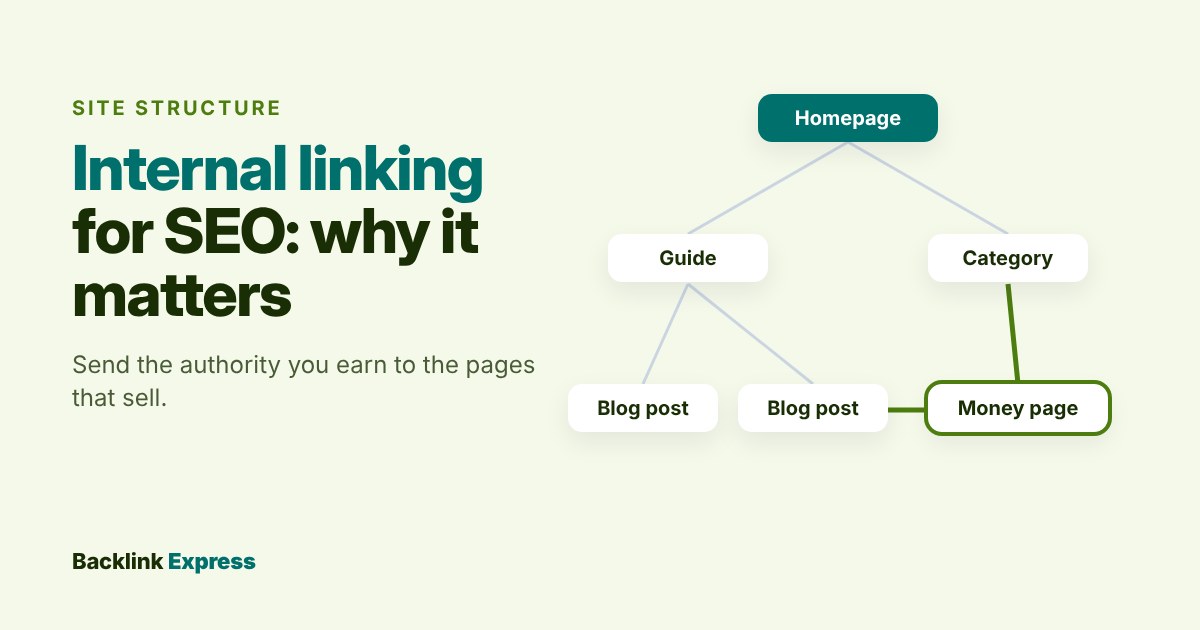
Internal linking for SEO means linking from one page of your site to another and it matters because those links are how Google finds your pages, works out what each one is about and decides which pages you treat as important. A page with no internal links pointing to it is close to invisible, no matter how good it is.
My position after working in SEO and link building since 2012: internal links are the cheapest links you will ever build and most sites waste the backlinks they already have because they never route them anywhere. Before you pay for another backlink, make sure the ones you have can reach the pages that earn you money.
This guide covers what internal links do, what Google actually says about them, which popular rules are myths and a backlink routing audit you can run in an afternoon with free Search Console data.
What is internal linking in SEO?
An internal link is any link from a page on your domain to another page on the same domain. Your menu, footer, breadcrumbs, “related posts” block and every link inside your body copy are all internal links. The difference from external links is simple: you control every internal link completely, while external links (backlinks) sit on sites you do not own.
| Link type | Where it sits | Main SEO job |
|---|---|---|
| Navigational (menu, header) | Every page, same position | Shows the site’s main sections and keeps key pages one click from anywhere |
| Footer and sidebar | Every page or a template | Reaches legal, contact and support pages; weak for topic signals because the same links repeat everywhere |
| Breadcrumbs | Top of inner pages | Shows the parent and child structure of the site |
| Contextual (in the body) | Inside the article or page copy | Connects related topics, with anchor text that describes the target page |
| Related or recent posts blocks | Below content, often automated | Gets new pages linked fast; quality depends on how relevant the picks are |
Here is an example of internal linking done right. A SaaS blog post about writing cold emails links to the company’s cold email templates page with the anchor “cold email templates” and the templates page links back to the guide and to a deliverability checklist. Three pages, one topic, every link describing exactly what the reader will get.
Internal links vs backlinks: what is the difference?
Backlinks bring in authority and relevance from other sites. Internal links decide where that authority goes once it arrives. If you want the full picture of the outside half, our guide to what backlinks are and how they work covers it. Both matter and they work as a pair: backlinks fill the tank, internal links are the pipes.
Do external links help with SEO? Backlinks from relevant, real sites do. Outbound links from your pages to good sources help your readers and show what your page relates to, but they are not a ranking lever you should chase. The lever you fully control is the internal one.
Why are internal links important for SEO?
Internal links do four jobs and Google’s own documentation backs each one.
1. They are how Google finds your pages
Google’s How Search Works guide says that “pages are discovered when Google extracts a link from a known page to a new page”. Sitemaps are the other main route. A page with no internal links, often called an orphan page, depends on the sitemap alone. Google also states that it does not crawl every page it discovers and that indexing is not guaranteed, so a page that sits outside your link structure starts at a disadvantage. If you want the mechanics, here is how crawling and indexing differ.
2. They tell Google what a page is about
Google’s link best practices say Google “uses links as a signal when determining the relevancy of pages and to find new pages to crawl”. The same page says good anchor text is “descriptive, reasonably concise and relevant” and that paying more attention to the anchor text of internal links can help both people and Google make sense of your site. Generic anchors like “click here” or “read more” waste that signal.
3. They move authority around your site
Google’s ranking systems guide says it has “various systems that understand how pages link to each other as a way to determine what pages are about” and that PageRank, one of its original systems, is still part of its core ranking systems, although it has changed a lot since launch. In practice, a page that has earned strong backlinks can pass some of that strength to the pages it links to. Nobody outside Google can tell you how much flows through one link, so ignore anyone who quotes a percentage.
4. They show which pages you care about
A page linked from your menu, your homepage and twenty related articles looks central. A page linked once from a 2019 blog post looks like an afterthought. Google’s guidance is blunt: “Every page you care about should have a link from at least one other page on your site.” One link is the floor, not the goal.
Notice what is missing from that list. You will often read that internal links rank pages because they “reduce bounce rates”. Google has never confirmed bounce rate as a ranking signal. Internal links help readers find the next useful page and that is reason enough. Do not build your strategy on an engagement metric Google does not use.
The mistake that costs link buyers the most
Here is where I part ways with most internal linking guides. They treat internal links as a tidy-up job for content editors. For anyone who builds or buys links, internal linking is where the return on that spend is decided.
Think about where backlinks actually land. Editors and journalists link to useful content: guides, data, tools, glossaries. They rarely link to a pricing page or a service page. So your strongest pages by backlinks are usually informational and your money pages often have almost none. If those informational pages do not link to the money pages, the authority you paid for or earned sits on pages that do not convert and it stops there.
The same goes for deep links to inner pages. A guest post that links to a guide is worth more when that guide passes readers and relevance on to the product or service page behind it. I would rather you spend one week fixing internal links than one month adding new backlinks to a site whose structure leaks.
How to audit internal links against your backlinks
This is the first check we recommend on any site and it needs nothing more than Google Search Console and a spreadsheet. The Search Console Links report shows both “Top linked pages” from external sites and top linked pages from within your own site and you can export each table (up to 1,000 rows) as a CSV or Google Sheet.
- Export external top linked pages. Links report, External links, Top linked pages, Export. This tells you where backlinks land.
- Export internal top linked pages. Links report, Internal links, Top linked pages, Export. This tells you where your own site sends its links.
- List your money pages. The 5 to 20 pages that drive revenue or leads: product, service, category, pricing and key landing pages.
- Merge the three lists. One row per URL with three columns: backlinks (external), internal links and money page yes or no.
- Find the leaks. Pages with many backlinks: open each one and check whether it links, in the body, to the relevant money page. Money pages with few internal links: add contextual links from the related pages that already rank or have backlinks.
- Fix, then recheck in 4 to 8 weeks. Search Console updates link data over time, so expect the report to lag behind your changes.
Two caveats. Google says the report “isn’t a comprehensive list of every link on your site”, so treat it as a sample and confirm big decisions with a crawler. And for a page-level view of link strength from third-party tools, use a page-level metric such as Ahrefs UR rather than a domain-level score.
What is the best internal linking strategy for SEO?
The best strategy is the one that matches your site’s real structure: group pages by topic, make one page the main page for each topic and link the supporting pages to it and to each other. People call this a topic cluster, a hub, or a silo. The label does not matter. The rules do:
- One main page per topic. If two pages target the same query, pick one and point the other’s internal links at it. Mixed signals split your relevance.
- Links in the body beat links in templates. A contextual link with a descriptive anchor tells Google more than the same link repeated in every footer.
- Link new pages on day one. Add at least two or three links to every new page from older related pages that already get crawled, not only from the new page outwards.
- Use descriptive anchors and vary them. Our exact anchor text guide covers the balance. Internal anchors carry less risk than external ones, but a page with the same exact-match anchor pasted fifty times reads badly to people and to Google.
- Keep important pages shallow. Pages that need several clicks from the homepage get found and refreshed less. “Three clicks” is a rule of thumb, not a Google threshold, but it is a sensible target for money pages.
How many internal links should a page have?
There is no correct number. Google’s link best practices say: “There’s no magical ideal number of links a given page should contain.” The same page warns that too many links can make a page harder for people to use.
Several popular rules do not hold up. Claims that Google stops following links after 100 or 400 per page, or that “only the first link counts”, circulate on well-ranked pages without a current source, so we do not repeat them as fact. Our rule is practical: link wherever a reader would want to go next and if a paragraph has more links than sentences, cut some.
Internal linking mistakes that quietly cost rankings
| Mistake | Why it hurts | Fix |
|---|---|---|
| Orphan pages | Found only through the sitemap, if at all | Link every page you care about from at least one relevant page |
| Links that are not real links | Google says it can generally only crawl an <a> element with an href; click handlers and buttons without one may be missed |
Use standard anchor tags, even when JavaScript inserts them |
| Internal links through redirects | Extra hops, slower crawling, messy reports | Update links to the final URL after any migration or slug change |
| Broken internal links | Dead ends for readers and crawlers | Crawl monthly and fix 404s at the source |
| Nofollow on your own links | Tells Google not to follow a path you built for it | Remove it; for pages you do not want crawled, Google’s link attribute guidance points to robots.txt rules for links within your own site |
| “Click here” anchors | No topic signal at all | Describe the destination in a few words |
| Money pages linked only from the menu | No contextual relevance flowing in | Link them from the guides that already earn backlinks |
If rankings drop after a redesign or migration, check these first. Broken links, redirect chains and new orphan pages are easy to create in a template change and easy to miss and they are worth ruling out before you blame an algorithm update.
What are the best internal linking tools for SEO?
You need three kinds of tool and at least one of each is free.
- Google Search Console (free). The Links report shows internal and external top linked pages. It is a sample, but it is Google’s own data.
- A crawler. Tools such as Screaming Frog SEO Spider or Semrush Site Audit find orphan pages, broken links, redirect chains and click depth across the whole site.
- A suggestion plugin, if you publish often. On WordPress, Yoast SEO Premium and similar plugins suggest related posts to link while you write. Treat suggestions as a shortlist and check each one; automated linking without review produces irrelevant links.
No tool replaces the judgement step in the audit above: deciding which pages deserve the authority your backlinks bring in.
Does internal linking matter for AI search?
Several top guides now claim internal links make your pages more likely to be cited by AI answer engines. We could not find a primary source that shows this, so treat it as a reasonable guess, not a fact. What is documented is the basics: Google uses links to find pages and to understand what they are about. A page that is well linked, clearly titled and easy to crawl is in a better position everywhere. That is enough reason to do the work.
When internal links will not save a page
Internal linking fixes discovery, relevance and the routing of authority you already have. It cannot create authority your site does not have. If your best page has five weak backlinks and the pages above you have hundreds of relevant ones, rearranging links between your own pages will not close that gap. It also will not rescue thin content: linking twenty times to a page that does not answer the query just sends readers to a disappointment faster.
That is the honest order of work. Fix the structure first, because it is free. Then measure the gap between your money pages and the pages ranking above them and build or buy relevant links to close it. When you buy, mark paid placements with rel="sponsored" as Google asks and only use sites with real traffic and an editor who decides what goes live.
If your internal links are in order and the page still needs editorial links from relevant sites, browse vetted publishers on Backlink Express. Each listing shows the site, its traffic and the price up front and the publisher’s editor decides what goes live, so the links you add land on pages your internal structure can put to work.