Last updated: 24 October 2026
A backlink is a link on another website that points to a page on your website. If a food blog links to your recipe page, that link is a backlink for you. Google uses links like this to find your pages and as one signal of how relevant and trusted they are.
Here is my position after working in SEO and link building since 2012: the “vote of confidence” line you will read everywhere is the reason beginners waste money on links. A backlink is not a vote that gets counted automatically. It is a citation that Google can follow, discount or ignore, depending on where it sits and how it was made.
This guide shows you what a backlink looks like in code, how Google actually treats it, which links help and which do nothing, what they cost and how to check your own in ten minutes.
What is a backlink in SEO?
In SEO, a backlink is any link from a page on one domain to a page on a different domain. From your side it is an inbound link. From the linking site’s side it is an outbound link. Same link, two names.
You will also see these terms and they are not the same thing:
| Term | What it means | Why it matters |
|---|---|---|
| Backlink (inbound link) | A link from another site to yours | The thing this guide is about |
| Internal link | A link from one page on your site to another page on your site | You control it fully; it spreads value you already have |
| Outbound link | A link from your site to someone else’s | It is a backlink for them, not for you |
| Referring domain | A unique website that links to you | Ten links from one site are still one referring domain |
| Backlink profile | Every link pointing to your site, taken together | Google and SEO tools judge the pattern, not a single link |
Internal links are worth your attention too, because they decide how value moves around your site once a backlink lands on it.
What does a backlink look like? A real example
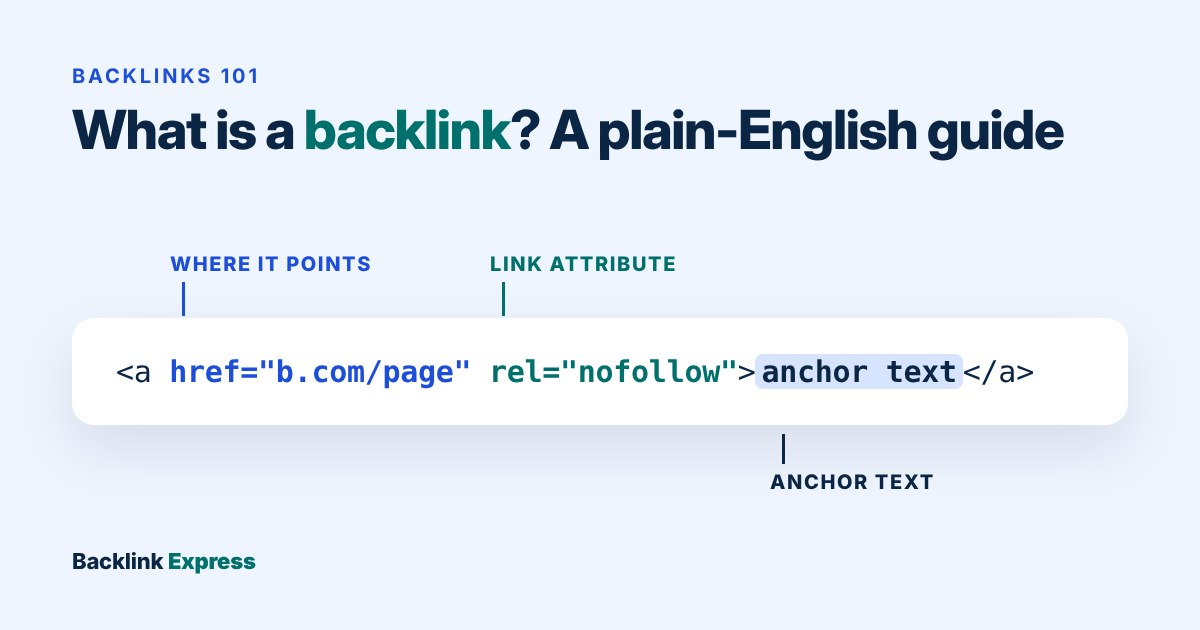
Most explainers stop at “a link from one site to another.” That is not enough to judge a link. You need to see its parts. Here is a typical backlink as it sits in the HTML of the linking page:
<p>For a dairy-free version, try this
<a href="https://www.example.com/vegan-brownies" rel="sponsored">vegan brownie recipe</a>
from a London bakery.</p>
Read it like an SEO would. It has five parts and each one changes what the link is worth:
| Part | In the example | What to ask |
|---|---|---|
| 1. The source page | The food blog’s article that contains the paragraph | Is it a real page that people read, on a topic close to yours? Is it indexed in Google? |
2. The <a href> tag |
href="https://www.example.com/vegan-brownies" |
Is it a normal HTML link? Google says it can generally only crawl links that are <a> elements with an href. |
| 3. The target URL | /vegan-brownies on your site (example.com stands in for your domain) | Does it point to the page you want to rank and does that page load without a redirect or 404? |
| 4. The anchor text | “vegan brownie recipe” | Does it describe the target page in natural words? |
| 5. The rel attribute | rel="sponsored" |
Is it marked sponsored, ugc or nofollow? If so, it is a hint to Google, not a full endorsement. |
The surrounding sentence matters as well. A link in the middle of a relevant paragraph tells Google and the reader why the page is being cited. The same link in a footer list of 40 unrelated sites tells them almost nothing.
How do backlinks work?
Google describes two jobs for links. In its documentation on making links crawlable, it says it uses links “as a signal when determining the relevancy of pages and to find new pages to crawl.”
So a backlink does two things for you:
- Discovery. Googlebot follows links from pages it already knows. A link from a crawled page is one of the ways a new page of yours gets found.
- Ranking signal. Google’s ranking systems guide says it has “various systems that understand how pages link to each other,” and that PageRank, the link-based system Google launched with, “continues to be part of our core ranking systems.”
A third job has nothing to do with Google: people click links. A backlink on a page with a real audience can send you visitors who never searched for you. That is the one benefit you can measure directly, in your analytics, under referral traffic.
What Google does not say is that backlinks are “a primary ranking factor.” Google’s AI Overview for this keyword says it and ChatGPT told us the Search Quality Rater Guidelines rate backlinks as “very important.” Neither claim holds up. The rater guidelines are instructions for human raters who judge page quality, not a list of ranking factors. Links are one signal among many, alongside relevance, content quality and usability.
Why the “vote of confidence” idea misleads beginners
The vote metaphor implies every link counts and more votes win. Google’s own documents describe something else:
- Some links are hints, not votes. Links marked
rel="nofollow",rel="sponsored"orrel="ugc"tell Google not to treat them as an endorsement. Since 2019, Google treats all three as hints it may or may not use. - Some links are ignored. Google’s spam systems are built to neutralize manipulative links, so a link bought or swapped purely to move rankings may simply count for nothing.
- Some links are a liability. A pattern of manipulative links breaks Google’s spam policies and can cost you rankings.
Our view at Backlink Express: judge a backlink by whether a real reader of that page would plausibly click it. If the answer is yes, the link is doing at least one job for you. If the answer is no, a tool may still count it, but you should not count on it.
Dofollow vs nofollow, sponsored and ugc: what each one means
“Dofollow” is not a real attribute. It is SEO slang for a normal link with no rel value that limits it. The three values that do exist are set out in Google’s guide to qualifying outbound links:
| Link type | HTML | Google’s use | Typical source |
|---|---|---|---|
| Standard (“dofollow”) | <a href="..."> |
Can pass ranking signals | Editorial mentions, resource pages, earned citations |
| Sponsored | rel="sponsored" |
For ads and paid placements; a hint | Paid guest posts, sponsorships, advertorials |
| UGC | rel="ugc" |
For user-generated content; a hint | Comments, forum posts, community answers |
| Nofollow | rel="nofollow" |
When the others do not apply; a hint | Links a site does not want to vouch for |
One correction to the SERP: Google’s AI Overview says sponsored links are “frequently tagged as nofollow.” Google’s guidance is that paid links should use rel="sponsored"; nofollow is “still an acceptable way to flag them, though sponsored is preferred.” We go deeper on this in our guide to dofollow and nofollow links.
What makes a backlink good or bad?
Quality beats count. A short list of checks will sort most links before you ever open a paid tool:
| Check | Strong backlink | Weak or risky backlink |
|---|---|---|
| Topic fit | The linking page covers your subject or a close one | A casino blog linking to a dental clinic |
| Real audience | The site gets organic traffic and has readers | No traffic, no indexed pages, built only to sell links |
| Placement | Inside the main content, in a sentence that explains it | Footer, sidebar, sitewide blogroll, author bio stuffed with links |
| Anchor text | Natural: brand name, page title or a plain description | The same exact-match money keyword on link after link |
| Disclosure | Paid links marked sponsored | Paid links disguised as editorial |
| Company it keeps | A handful of relevant outbound links on the page | Dozens of unrelated outbound links in one post |
Third-party scores help you compare sites quickly, but treat them as estimates. Domain Rating (Ahrefs) and Domain Authority (Moz) are tool metrics, not Google metrics. Our explainer on DR and UR shows how to read them and you can check any domain with our free DR checker.
Anchor text is where beginners get into trouble fastest. Google’s spam policies name “links with optimized anchor text in articles, guest posts, or press releases distributed on other sites” as an example of link spam. Our anchor text guide explains how to keep anchors natural.
Types of backlinks you will come across
Every backlink comes from one of a few sources. Knowing which one you are looking at tells you most of what it is worth:
- Editorial links: a writer cites your page because it helps their reader. The best kind and the hardest to get.
- Guest post links: you write an article for another site and it links back to you. Value depends on the host site’s quality and editorial standards. If you paid for the placement, Google expects it to be marked sponsored.
- Digital PR and media links: journalists link to your data, study or expert comment.
- Business profiles and directories: listings on industry directories, associations and local platforms. Useful for discovery and local trust; many are nofollow.
- Partner and supplier links: links from companies you actually work with.
- User-generated links: comments, forums, Q&A sites. Usually marked ugc or nofollow and rarely worth chasing for rankings.
Are backlinks still relevant in 2026?
Yes. Google’s documentation, last updated in December 2025, still lists link analysis and PageRank among its core ranking systems and still uses links to find pages. That is the strongest evidence available and it comes from Google, not from a tool vendor.
What has changed is how much weight cheap links carry. Spam systems are better at ignoring them, so the gap between a cited link on a real site and a link on a link farm is wider than it used to be.
AI search adds a second reason to care. AI answers, including Google’s AI Overviews, cite web pages and a page has to be found and trusted before it can be cited. Studies from SEO tool companies suggest links correlate with AI visibility, but they are correlations from vendors, not proof. Our advice: earn links that would make sense even if AI search did not exist and you are covered either way.
How do I check my backlinks?
You can see your own backlinks for free in ten minutes:
- Google Search Console. Open the Links report in Search Console. It shows top linking sites, top linked pages and top anchor text. It is a sample, not every link, but it comes from Google.
- A backlink tool. Ahrefs, Semrush, Moz and others crawl the web and list links Search Console does not show. Each tool has its own index, so counts differ between them.
- Sort by referring domains, not total links. One site with a sitewide footer link can show up as thousands of backlinks.
- Open the top 10 linking pages. Ask the reader question from earlier: would a person on this page plausibly click my link?
- Check anything that looks off. Unknown foreign-language sites, adult or gambling pages, or sudden spikes are worth a closer look. Our free spam score checker gives a quick first read.
How to get backlinks (and which ways to avoid)
The best way to get backlinks is to have something on your site worth citing, then put it in front of the people who write about your topic. In practice that means:
- Publish one genuinely useful asset: original data, a calculator, a clear guide, a template.
- Find pages that already link to weaker resources on the same topic and tell their owners about yours.
- Answer journalist requests in your area of expertise. Cision folded HARO into its Connectively platform and shut that down in December 2024, but Featured.com relaunched HARO as a free service in April 2025 and revived the Connectively name in 2026 as a separate request platform. Qwoted is another option.
- Get listed where your customers already look: industry directories, associations, partner pages.
- Write guest posts for relevant sites with real readers, with natural anchors and the paid ones marked sponsored.
Avoid anything Google lists as link spam in its spam policies: buying or selling links for ranking purposes without qualifying them, excessive link exchanges and automated link-building programs. Private blog networks fall in the same bucket. If a seller cannot show you the site’s traffic and the page your link will sit on, walk. Our link building guide covers the full process.
Where can I get free backlinks?
Free backlinks come from editorial citations, partner and supplier pages, business profiles, industry associations, unlinked brand mentions you ask to be linked and expert quotes for journalists. They cost time instead of money. “Free backlink” lists of comment and profile sites are mostly nofollow and rarely help.
How much do backlinks cost?
There is no standard price. A placement’s cost depends on the site’s traffic, topic, editorial standards and whether content is included. Earned links cost staff time or agency fees instead of a placement fee.
Two rules protect your budget. First, compare the price with what you can verify: traffic, relevance and the page your link will appear on. Second, never treat a paid link as a hidden editorial one. Google’s spam policies say buying and selling links is “a normal part of the economy of the web” as long as the links are qualified with nofollow or sponsored. A marketplace like Backlink Express lists the site and its price up front and the publisher’s editor decides what goes live.
How many backlinks per day is safe?
No number is safe or unsafe on its own. Google publishes no daily quota. What matters is how the links were made: 50 links from a news story about your data is normal; 50 links in a day from sites you paid with keyword-rich anchors is a pattern Google’s spam policies describe.
How many you need depends on the pages you are competing with, not a rule of thumb. Our guide on how many backlinks you need to rank walks through the comparison.
When backlinks will not fix your rankings
Links amplify a page; they do not rescue one. Before you spend on links, check that:
- the page is indexed and has no technical block (noindex, broken canonical, redirect loop)
- it matches what searchers want for that keyword
- it is better than the pages already ranking, not just as good
If any of these fail, fix the page first. A link to a page that cannot rank is money spent on the wrong problem.
Ready to add relevant links to a page that deserves them? Browse vetted publishers on Backlink Express and see each site, its traffic and its price before you order.