Toxic backlinks are links that look built to manipulate rankings, and most of the ones an SEO tool flags are spam Google already ignores. The links that can actually hurt you are the ones you, or someone you paid, built to pass ranking credit. And if a link spam update has already stripped their value, no disavow file brings it back: Google’s own documentation says that benefit “cannot be regained.”
So stop auditing for a toxicity score. Audit for your own footprint. Here is how to find the links that matter, when to ignore the rest, and what Google’s documents say that the top-ranking guides leave out.
What are toxic backlinks?
“Toxic backlinks” is an SEO tool term, not a Google one. Google’s John Mueller put it plainly at a Search Central Live event in New York, as Search Engine Journal reported in April 2025: “internally we don’t have a notion of toxic backlinks.”
What Google does have is a definition of link spam. Its spam policies (last updated 28 August 2026) call it “the practice of creating links to or from a site primarily for the purpose of manipulating search rankings.”
That gives you two very different kinds of “bad” link:
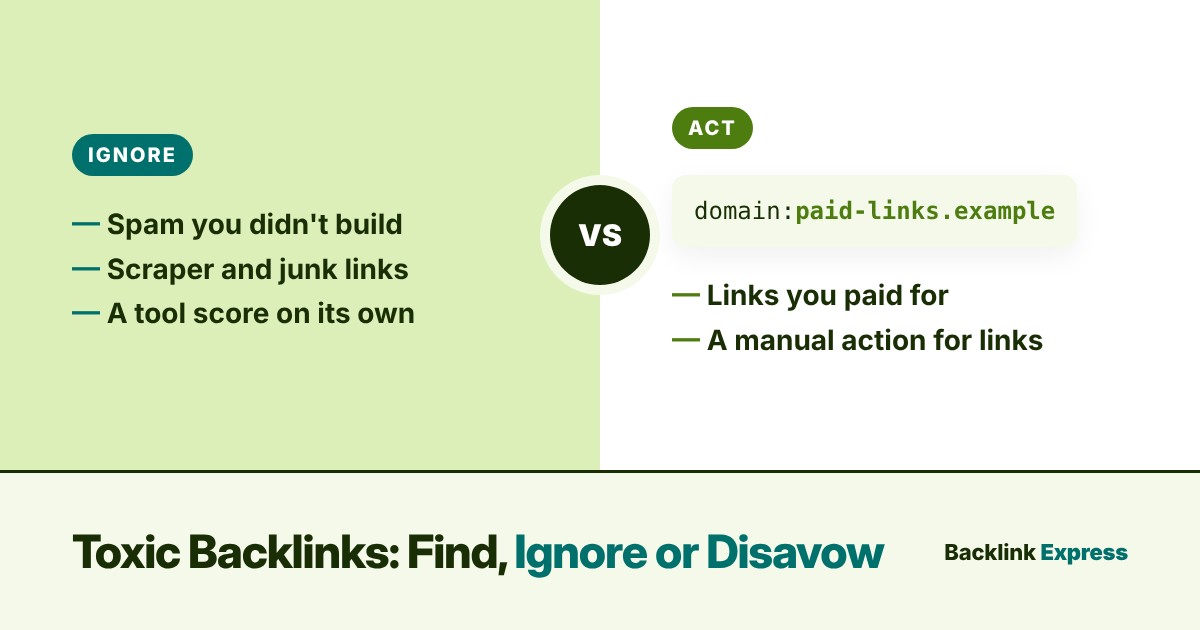
- Spammy links: scraper sites, auto-generated pages, random foreign directories. Every site collects them. You didn’t ask for them.
- Manipulative links: links bought, swapped or automated to move rankings. Someone chose to build them.
Tools blend the two into one red number. Google doesn’t. That difference decides everything you do next.
What makes a backlink bad?
The top guides agree on the usual suspects, and nearly all of them map to examples Google lists in its link spam policy. The useful column is the last one: who usually built the link.
| Pattern | How Google’s spam policy describes it | Who usually built it |
|---|---|---|
| Paid links that pass ranking credit | Buying or selling links for ranking purposes | You or your vendor |
| Link swaps at scale | Excessive link exchanges, partner pages for cross-linking | You or your vendor |
| Automated links (comments, profiles, forums) | Automated programs or services that create links | You, a vendor, or a stranger |
| Low-quality directories and bookmarks | Low-quality directory or bookmark site links | Often an old SEO campaign |
| Widget and footer links across many sites | Widely distributed links in footers or templates | You (often years ago) |
| Keyword-stuffed anchors | Links with optimized anchor text in articles, guest posts or press releases; keyword-rich links in widgets | Whoever wrote the anchor |
| Hacked or injected links | Covered separately, as hacked content, in Google’s spam policies | A third party |
If most of your “toxic” list sits in the third-party rows, you probably have nothing to fix. If it sits in the first rows, you do. Our guides on link exchanges and black hat SEO cover where Google draws those lines.
How can I identify toxic backlinks?
Start with Google’s data, then use a third-party tool to dig. Never the other way round.
- Open the Manual actions report in Search Console (Security & Manual Actions). If it says “No issues detected,” no human reviewer has penalised your links. That changes the urgency of everything below.
- Export the Links report. Download “Top linking sites” and “Latest links.” Google’s manual actions help page tells you to start from your Search Console link data, and the domains that link most and the newest links are where manipulation shows first.
- Read your anchor text. In Ahrefs, Semrush or Majestic, sort anchors by count. A profile where exact-match money keywords outnumber your brand name is the clearest pattern you’ll find. Our exact match anchor text guide explains why there is no published “safe” percentage.
- Open the linking pages. Ask one question of each cluster: did you, or someone you paid, build this? A “write for us” page with no traffic and twenty casino links per post is a different problem from a scraper copying your RSS feed.
- Use tool scores to sort, not to judge. Semrush’s Toxicity Score runs 0 to 100 and, by the description in Semrush’s own help documentation, a high score means a link is more likely risky, not that it is harming you.
For the other side of the audit, what a link worth keeping looks like, see our guide to high quality backlinks.
Does Google ignore toxic backlinks?
Mostly, yes. Google’s disavow links help page says: “In most cases, Google can assess which links to trust without additional guidance, so most sites will not need to use this tool.”
Mueller went further at the same event: the disavow tool is “not a part of normal site maintenance,” and he would “mostly use the disavow tool for situations where you’ve been actually buying links.”
That is the line I hold after a decade in SEO and link building. Random spam is background noise. Patterns you created are the risk. Negative SEO gets blamed for a lot of drops, but Google’s people have said for years that they look for patterns, not a handful of junk links pointed at you overnight.
If your traffic fell and you have no manual action, check the other causes first. Our list of reasons rankings drop is a faster place to start than a disavow file.
How to get rid of toxic backlinks
Removal comes first. Google’s manual actions page is explicit: “If you can get a backlink removed, make a good-faith effort to remove the link first.”
- Paid links you placed: ask the publisher to remove the link or qualify it. Google’s spam policy says paid links are not a violation “as long as they are qualified with a rel=”nofollow” or rel=”sponsored” attribute.” On a paid placement,
rel="sponsored"is the honest label. - Old directory and widget links: remove what you control (your own widgets, partner pages, footer credits) before you email anyone.
- Links you didn’t build: leave them. Emailing scraper sites wastes hours and rarely gets a reply.
How can I disavow toxic backlinks?
Only when Google’s own test is met. Its help page says to disavow if you have “a considerable number of spammy, artificial, or low-quality links” pointing to your site, and those links have caused a manual action or likely will. It also warns: “If used incorrectly, this feature can potentially harm your site’s performance in Google Search results.”
If you pass that test, the process is short: build a .txt file, one URL or domain:example.com per line, and upload it in the disavow links tool for your property. The rules for that file are where most cleanups go wrong, so they get their own section below.
What most guides miss about link spam updates
The AI Overview for this keyword says to act on “a sudden, unexplained ranking drop.” That advice sends people straight to the disavow tool after a link spam update. Google’s own documentation says that won’t bring the rankings back.
Google’s spam updates page (last updated 10 December 2025) says that once its systems remove the effect of spammy links, “any ranking benefit the links may have previously generated for your site is lost,” and that those benefits “cannot be regained.” For link spam updates specifically, it adds that “making changes might not generate an improvement.”
Read that as an SEO, not a lawyer. A drop during a link spam update is usually credit that was neutralised, not a penalty you can lift. A disavow file tells Google to ignore links it is most likely already ignoring. What it can’t do is give you the value back.
What to do differently:
- Check the dates. Compare your drop with Google’s Search Status Dashboard. If it lines up with a link spam update and you have no manual action, the disavow tool is not your fix.
- Stop building the pattern that got neutralised. More of the same links will be discounted the same way.
- Replace the lost value with links Google counts: editorial links on relevant sites that people actually read.
The disavow file rules most guides leave out
The top guides say “make a .txt file and upload it.” Google’s help page has rules that decide whether that file does what you think. None of the top-ranking guides reviewed for this post lists them.
| Rule (Google disavow help page) | What it means for you |
|---|---|
| “Uploading another list to this property will replace the existing list for this property.” | Download the current file and add to it. Uploading only this month’s domains silently un-disavows everything from before. |
| “The disavow links tool does not support Domain properties.” | Use a URL-prefix property. The list applies per property, so http and https versions need their own uploads. |
| Maximum 100,000 lines (blank and comment lines count) and 2MB | Use domain: lines instead of listing thousands of single URLs. |
| You cannot disavow a subpath such as example.com/en/ | Disavow the exact URL or the whole domain. Nothing in between. |
| UTF-8 or 7-bit ASCII, file name ends in .txt, # starts a comment | Export from a spreadsheet as plain text, not .csv. Use # lines to note when and why you added each block. |
| “Disavowed links will continue to be shown in the Links report.” | The Links report won’t prove the disavow worked. Don’t re-upload because the links are still listed. |
| Processing “can take a few weeks”; Cancel Disavowals also takes weeks | A disavow is slow to apply and slow to undo. Get it right the first time. |
The replacement rule is the expensive one. Upload a fresh file built from a tool’s latest “toxic” export, and the older list that actually answered a manual action is gone.
What most guides get wrong about manual action cleanup
The top-ranking guides reviewed for this post stop at “submit a reconsideration request.” Google’s manual actions page asks for more, and the gaps cost weeks.
- Show your work. For link actions, Google says your request should document the links you removed and explain the ones you couldn’t remove. Keep a log: linking domain, date contacted, reply, outcome.
- Fix everything before you ask. Google says to request review only “when all issues listed in the report are fixed in all pages.” Cleaning half the profile does not earn half a recovery.
- Expect a longer wait. Most reviews take “several days or weeks,” and Google notes that link-related requests “may take longer than usual.”
- Stop the source. Mueller said at the same event that a manual action for bought links won’t be lifted while the buying continues. A disavow file paired with an active paid-link campaign won’t fix that.
When to ignore toxic backlinks, and when to act
| Your situation | What to do |
|---|---|
| Spam you didn’t build, no manual action | Ignore it. Google’s own help page says most sites never need the disavow tool. |
| Traffic drop that matches a link spam update, no manual action | Don’t disavow to recover. The credit is gone. Earn replacement links and check other causes. |
Paid links you placed without rel="sponsored", no manual action |
Ask publishers to add rel="sponsored" or remove the link. Consider a disavow only if the pattern is large and you can’t clean it. |
| Manual action for unnatural links to your site | Remove first, disavow the rest at domain level, keep a log, then request review. |
Which sites are most exposed? Not the ones with the most spam pointed at them. The ones with a history of bought, swapped or automated links that pass ranking credit. A clean site with ten thousand junk links is in better shape than a site with two hundred paid links on a network nobody reads.
My position is simple. If you didn’t build it, Google almost certainly isn’t counting it against you. If you did, fix it at the source, label paid placements with rel="sponsored", and use the disavow tool for what Google built it for: cleaning up your own link buying, not the internet’s spam.
Disclosure: Backlink Express is a marketplace that sells link placements on publisher sites.
When you do buy placements, pick sites you can see before you pay: real traffic, real editors, and a clear label on the link. Browse vetted publishers on Backlink Express.