Last updated: 13 November 2026
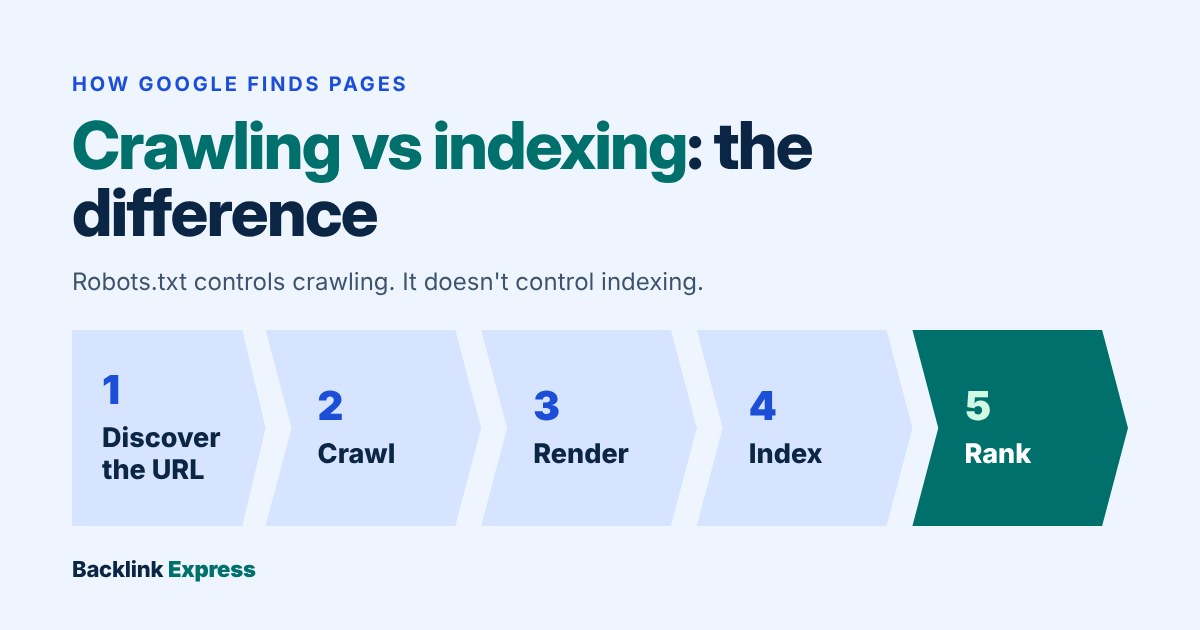
Crawling is when Googlebot finds a URL and downloads it. Indexing is what happens next: Google reads the page, decides which version of it counts and chooses whether to store it in its index. A page can be crawled and never indexed and only indexed pages can appear in search results.
That definition is the easy part. Here is my position after working in SEO and link building since 2012: knowing the difference is only useful if you can tell which stage a page is failing at, because the fixes point in opposite directions. A crawl problem is an access problem you fix on the server. An indexing problem is a decision, made either by you (noindex, canonical) or by Google (duplicate, not worth storing yet). Treat one like the other and you waste weeks.
This guide uses Google’s own documentation and Search Console’s Page indexing statuses to show what each stage does, how to read the status Google gives a page and what to do about it.
What is the difference between crawling and indexing?
Google’s How Search Works guide splits Search into three stages: crawling, indexing and serving. Google also says plainly that not all pages make it through each stage. The table below shows where the line between the first two sits.
| Crawling | Indexing | |
|---|---|---|
| Question it answers | Can Google find and fetch this URL? | Should Google store this page and under which URL? |
| Who does it | Googlebot, the fetching program | Google’s indexing systems, after the fetch and render |
| What happens | URL discovery, then a request to your server, then rendering of the page with a recent version of Chrome | Google works out what the page is about, groups it with near-duplicates and picks a canonical |
| Your controls | robots.txt, server health, internal links, XML sitemaps | noindex, rel="canonical", redirects, the content itself |
| Typical failures | 5xx server errors, robots.txt blocks, login walls, URLs Google has not got round to | noindex left on, duplicates, a different canonical chosen, pages Google crawled but did not keep |
| Guaranteed? | No. Google says Googlebot does not crawl all the pages it discovers | No. Google says indexing is not guaranteed |
A simple way to hold it in your head: crawling is about access, indexing is about selection. If Google never got the page, nothing downstream matters. If Google got it and still left it out, you have a selection problem and no amount of resubmitting fixes that.
How does crawling work?
There is no central registry of web pages, so Google has to keep looking for new and updated URLs. It finds them mainly through links from pages it already knows and through sitemaps you submit. That is why internal links matter so much for new pages: a URL that nothing links to is hard to discover.
Once a URL is known, Googlebot decides algorithmically which sites to crawl, how often and how many pages. Then it fetches the page and renders it, running any JavaScript in a recent version of Chrome. If your content only appears after JavaScript runs, rendering is part of whether Google sees it at all.
Google names the usual crawl blockers: problems with the server handling the site and robots.txt rules that stop Googlebot from reaching the page.
What is crawl budget and does it apply to you?
Crawl budget is Google’s term for the set of URLs it can and wants to crawl on your site. It combines a crawl capacity limit (how hard Google can hit your server without hurting it) and crawl demand (how much Google wants your URLs, based on size, update frequency, quality and relevance compared with other sites).
Google’s own crawl budget guide is written for large sites: roughly 1 million or more pages that change weekly, or 10,000 or more pages that change daily and Google says those are not exact thresholds. If you run a 300-page blog, crawl budget is almost never your problem. Stop reading crawl budget threads and look at the status Google actually gave your page.
How does indexing work?
After a page is crawled, Google tries to understand what it is about. It processes the text, tags and media, then groups pages with similar content and picks the one most representative of the group. That chosen URL is the canonical, the version that may be shown in search results. The others become alternates.
Your canonical tag is a signal, not an order. Google’s canonicalization documentation ranks redirects and rel="canonical" as strong signals and sitemaps as a weak one. Google can and does choose a different canonical from the one you declared.
Then comes the part most explainers skip. Google says indexing is not guaranteed and that not every page it processes will be indexed. Two of the indexing issues it names are low-quality content and robots meta rules that disallow indexing. Google also says you should not expect every URL on your site to be indexed, only the canonical pages.
Is indexed the same as ranking?
No. Serving is the third stage. Google’s guide notes that Search Console might report a page as indexed while you still do not see it in results. An indexed page competes; a ranking page wins. If your page is indexed and invisible, it is a relevance, quality or competition problem and our guides on common causes of ranking drops and the Google sandbox theory are the next read, not this one.
Robots.txt controls crawling, not indexing
This is the error I see most often. Robots.txt does not keep a page out of Google.
Google’s robots.txt introduction says it is used mainly to avoid overloading your site with requests and that it is not a mechanism for keeping a web page out of Google. A disallowed URL that is linked from elsewhere can still be indexed, usually shown without a description. Search Console even has a status for it: “Indexed, though blocked by robots.txt”.
To keep a page out of the index, use noindex, as a robots meta tag or an X-Robots-Tag HTTP header (the header also works for PDFs and other non-HTML files), or put the page behind a login. And here is the trap: noindex only works if Googlebot can crawl the page and see it. Block the page in robots.txt and add noindex and Google never reads the noindex.
The rule of thumb:
- Want it crawled less: robots.txt.
- Want it out of the index: noindex, with the page left crawlable.
- Want duplicates consolidated:
rel="canonical"or a redirect.
How to tell which stage a page is failing at
Search Console gives you the answer if you read it in order. Open the Page indexing report, find the reason listed for the URL, then confirm it with URL Inspection. Google’s Page indexing report documentation defines every status. The table maps the ones that matter to the stage where the page stopped.
| Search Console status | Stage it stopped at | What it means | First action |
|---|---|---|---|
| Discovered - currently not indexed | Discovery (never fetched) | Google knows the URL but has not crawled it yet. Google says it may have rescheduled the crawl to avoid overloading the site. | Check server response times and Crawl Stats; add internal links from pages Google crawls often; keep it in the sitemap. |
| Server error (5xx) | Crawl (fetch failed) | Your server returned a 500-level error when Googlebot asked for the page. | Fix the server or hosting issue, then check Crawl Stats for how widespread it is. |
| URL blocked by robots.txt | Crawl (not allowed) | Your own rules stopped the fetch. | If you want it indexed, remove the rule. If you want it out of Google, remove the rule and use noindex instead. |
| Blocked due to unauthorized request (401) / access forbidden (403) | Crawl (access refused) | The server asked for credentials or refused Googlebot, which never logs in. | Make the page public, or keep it private on purpose. |
| Redirect error | Crawl (could not reach a final URL) | A redirect loop, a chain that is too long, or a bad URL in the chain. | Point the URL straight at its final destination in one hop. |
| Not found (404) | Crawl (fetched, nothing there) | The server said the page does not exist. | Fine for removed pages. If it moved, 301 it to the new URL. |
| URL marked ‘noindex’ | Indexing (your decision) | Google crawled the page, read your noindex and obeyed it. | If that is a mistake, remove the tag or header, then confirm with the live test. |
| Soft 404 | Indexing (Google’s judgment) | The page returns a success code but shows a not-found or empty page. | Return a real 404 for missing pages, or give the page real content. |
| Alternate page with proper canonical tag | Indexing (working as intended) | The page points to a canonical that is indexed. | Nothing. |
| Duplicate without user-selected canonical | Indexing (canonical choice) | Google sees a duplicate, you declared no canonical, Google picked one. | Usually nothing. Check which URL Google chose in URL Inspection. |
| Duplicate, Google chose different canonical than user | Indexing (canonical overruled) | You declared a canonical, Google picked another URL. | Compare both URLs in URL Inspection. Align redirects, canonicals, internal links and sitemap behind one URL. |
| Crawled - currently not indexed | Indexing (Google’s selection) | Google fetched the page and has not indexed it. It may or may not be indexed later. | Do not resubmit on repeat. Improve the page or merge it into a stronger one and link to it from pages that matter. |
| Page with redirect | Canonicalization (working as intended) | This URL redirects; the target may be indexed instead. | Nothing, unless the redirect is wrong. |
Read the table by column two. Everything marked “crawl” is solved by access: server, rules, login, redirects. Everything marked “indexing” is solved by a decision: yours (change the tag) or Google’s (change the page, or accept the outcome). Two rows say “nothing” and they are among the most common statuses in any report. A big “Not indexed” number is not a crisis on its own.
Discovered vs crawled - currently not indexed
These two get confused more than any other pair and the confusion is the whole point of this article.
“Discovered - currently not indexed” is a crawling problem. Google has the URL and has not fetched it. Google’s explanation points at the crawl itself, often delayed to avoid overloading your site. So look at things that affect crawling: slow responses, spikes of server errors, thousands of near-identical URLs (filters, parameters, tag pages) competing for the same attention and new pages that nothing links to. Large numbers of URLs in this status are one of the signs Google lists for reading its crawl budget guide.
“Crawled - currently not indexed” is an indexing decision. Google got the page and chose not to keep it, at least for now. Server tweaks will not move it. Google says you do not need to resubmit the URL. What changes the outcome is the page: is it substantially different from other pages on your site and on the web, is it the best version of itself and does your site signal that it matters through internal links?
Generic advice blurs the line. Noindex and canonical problems are often listed as typical causes of “crawled - currently not indexed”, yet Search Console reports those under their own statuses. “Low domain authority” is often blamed for discovery delays. Domain authority is a third-party metric, not something Google uses (our domain authority explainer covers why). Read the status Google actually gives you, not a generic list of causes.
What about 5xx errors, exactly?
Server errors deserve their own section because they hurt twice. Google’s HTTP and network errors documentation says 5xx and 429 responses make its crawlers slow down, in proportion to how many URLs return them and speed up again gradually once the server returns 2xx. And Google’s indexing pipeline removes URLs that persistently return a server error, even if they were indexed before.
So an unstable host does not just block new pages. It slows crawling for the whole site and can push existing pages out. Other 4xx codes (except 429) do not change crawl rate; a 404 just tells Google the page is gone.
A four-step check for any single URL
Use this order. Each step rules out a stage before you move to the next.
- Is it in Google? Run the URL through URL Inspection, or check up to 5 URLs at once with our free Google Index Checker. If it is indexed and you still get no traffic, you have a ranking question, not a crawling or indexing one.
- Did Google crawl it and when? URL Inspection shows the last crawl date and whether the fetch succeeded. If you fixed something after that date, Google has not seen the fix yet.
- Can Google crawl it now? Run the live test. It shows whether Googlebot can fetch the page today, whether robots rules block it and whether a noindex is present. One limit: Google says the live test does not check duplicate or canonical conditions, so a pass does not mean the page will be indexed.
- Which canonical did Google pick? Compare the user-declared and Google-selected canonical in the inspection result. If they differ, the page you are looking at is not the one Google wants to show.
After a fix, request indexing once through URL Inspection, or let the sitemap do it for many URLs. Google says crawling can take a few days to a few weeks, that requesting the same URL again does not speed it up and that a request does not guarantee inclusion. For site-wide fixes, the Validate fix button in the Page indexing report runs a check that Google says typically takes up to about two weeks.
When a guest post never gets indexed
This is where crawling vs indexing costs link buyers real money.
A common case: you place a guest post and the publisher sends the live URL, but three weeks later a site: search finds nothing and the publisher’s Search Console (if they share it) shows the URL as “Discovered - currently not indexed”. That is a crawl-stage stall. The usual cause on publisher sites is a new post buried under pagination with no links from pages Google visits often. The fix is on the publisher’s side: link the post from the homepage, a category hub or a related article and keep it in the sitemap.
Now say the status reads “Crawled - currently not indexed” instead. Google fetched the page and chose not to keep it. Resubmitting will not help. That points at the page itself or the site around it: thin or templated content, or a site that publishes many near-identical sponsored posts. That is a vetting signal about the publisher, not a tweak you can ask for.
A link on a page Google has not indexed cannot send you search traffic from that page and you have no visible proof Google has processed it. We treat an unindexed placement as unverified until it shows up. Before buying, check whether a publisher’s older guest posts are indexed. It takes a minute with an index checker and tells you more than a domain metric does. Our guide to backlinks covers what else separates a link that counts from one that just exists.
Mistakes that keep pages stuck
- Using robots.txt to hide pages. It stops crawling, not indexing and it hides any noindex you add.
- Leaving noindex on after launch. Staging settings that ship to production are a classic. The status “URL marked ‘noindex'” will say so.
- Resubmitting “crawled - currently not indexed” pages every week. Google says it does not need resubmitting and repeat requests do not speed anything up.
- Chasing crawl budget on a small site. Google’s guide targets sites with tens of thousands to millions of URLs.
- Expecting 100% indexed. Google says only canonical pages should be expected in the index. Redirects, alternates and parameter URLs are supposed to be excluded.
- Trusting a canonical tag to win every time. It is a strong signal, not a directive. Back it with consistent internal links, redirects and sitemap entries.
What this means for you
If you run a site, check the Page indexing report monthly and sort every “not indexed” reason into one of three buckets: crawl problem (fix access), your decision (confirm it is deliberate), or Google’s decision (improve, merge or accept). That sorting takes ten minutes and tells you exactly where to spend effort.
If you buy links, add indexing to your vetting. A placement on a well-known domain still sits on one URL and that URL has to be crawled and indexed like any other.
Want placements on sites whose content Google actually keeps? Browse vetted publishers on Backlink Express, see the site and price up front and check any URL with our index checker before and after it goes live.